Design System Linters
After migrating our design systems and transferring ownership and authorship of the component library to the design team, we were faced with a new challenge: how do we enforce usage of the design system? Especially as engineering teams began moving fast with AI coding agents, linters became our automated gatekeeper, ensuring that agent-generated UI conformed to our system rather than introducing rogue styling.
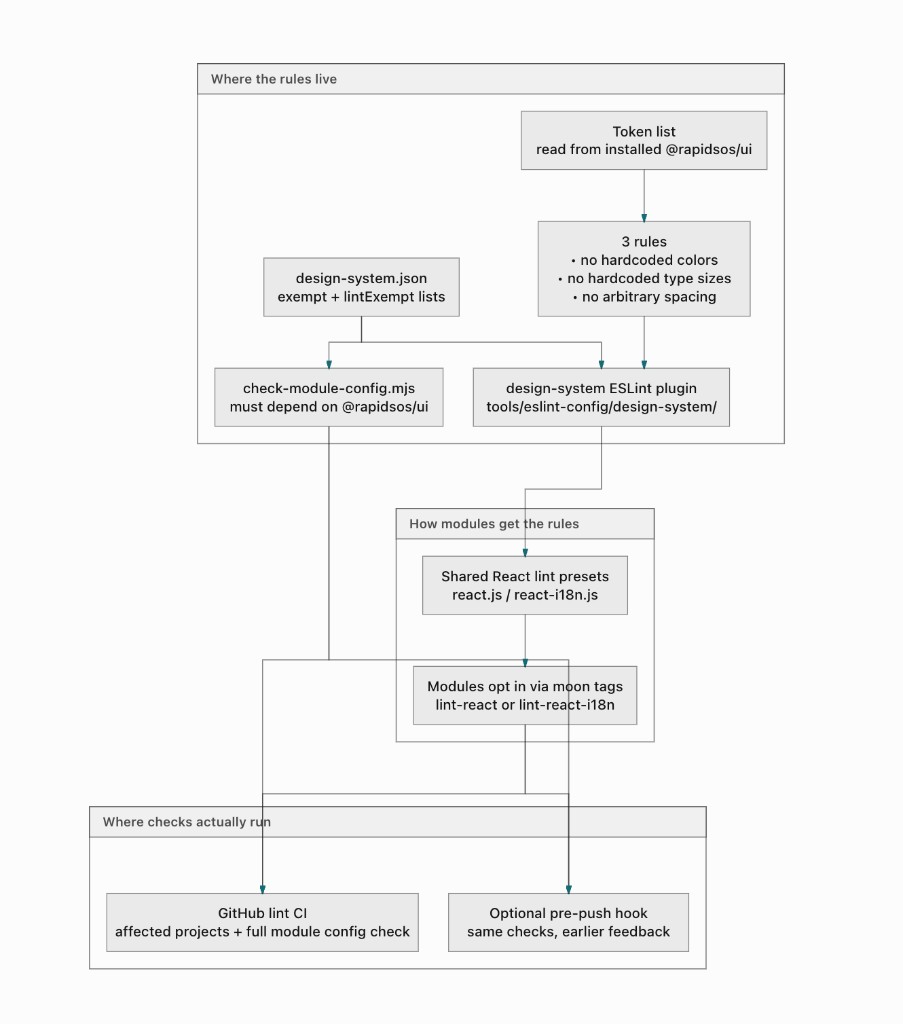
Design system guidelines vs real gates
AGENTS.MD and skills act as instructions and guidelines that spell out the rules: use shared colors and type, pull components from @rapidsos/ui, and don’t invent one-off styling. That guidance is useful for people and for AI agents, but at the end of the day it’s still just advice. Without checks that can fail a change, nothing stops someone from shipping hardcoded colors or skipping the shared component library.
What linters do
Linters are standard practice in software development, typically used to enforce syntax conventions and code quality standards. I adapted that format for the design system use case, building linters that automatically enforce adherence to our system rules. Running automatically whenever code is proposed for merge, they auto-fix simple formatting issues and flag larger problems like newly invented components directly to the design team.
V1 Linters
The initial linters I built focus on verifying baseline design system primitives with binary correct/incorrect states:
- Config check: Enforces that modules depend on the @rapidsos/ui component library, making system adoption a mandatory requirement and enabling downstream token checks.
- Colors: Blocks usage of raw hex values, one-off color classes, or Tailwind’s default palette in favor of design tokens.
- Typography & Spacing: Blocks arbitrary font sizes, padding, and margins outside our shared scales.
- Date/Timestamp: Flags custom date formatting in favor of normalized, accessible locale standards.
- Accessibility: Audits proposed markup to ensure valid contrast ratios and required aria- labels.
- Internationalization: Enforces string extraction patterns to prevent hardcoded interface text.
Future plans for more linters
The easiest things to lint for are fixed design system rules with explicit right-and-wrong answers. Things get trickier once we enter the domain of best practices and context. How do you lint for determining when to use a secondary button versus a tertiary button? How do we verify that an app screen maintains a strong visual hierarchy when code structure alone doesn't guarantee it?
Solving those questions is an active work in progress. I’m collaborating heavily with our engineering team exploring Abstract Syntax Tree (AST) parsing and browser testing tools like Playwright to find creative ways to automate visual QA and validate design intent. More coming soon…